


SmartMoving vs. MoveitPro
Looking for a MoveitPro alternative? See why movers choose SmartMoving.
Scale your moving company on one connected platform, without getting surprised by the monthly bill. See how SmartMoving and MoveitPro+ compare side by side, so you know exactly what you’re signing up for.
- 4.9 out of 5 from 143 verified Capterra reviews
- 1,200+ residential and commercial moving companies trust SmartMoving
- TOB-E AI operations assistant included in every package, with no tokens to buy or usage-based fees to track
Why movers choose SmartMoving over MoveitPro
Four reasons moving companies choose SmartMoving to run and grow their business.
One connected platform, from pickup to delivery
The inventory your crew records at pickup is the same record your warehouse scans into storage and your team checks at delivery. Sales, dispatch, crews, storage, and payments work from connected job information, without starting over at every handoff.
AI operations assistant included
TOB-E answers questions about your operations, flags issues that need attention, and recommends next steps using your business data. Included with every subscription at no additional fee, with no usage tokens.
Built for complex moving operations
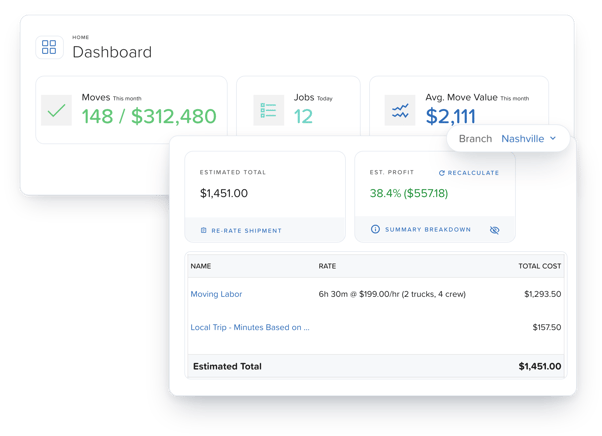
Manage multiple branches with location-level settings, permissions, and reporting. Build estimates for multi-day moves, apply state tariffs like Michigan intrastate, and see profit before you book, with labor, materials, truck, and fuel costs built in.
New releases every 2 weeks, built with movers
In October alone: hourly ranges on estimates, commercial accounts in Smart Pro, protected dispatch holds, and automations TOB-E builds from a plain-language request. See what’s new this month, or browse everything we shipped through October 2026.
The only moving software company in the 2026 Inc. 5000 top 500, trusted by 2,200+ operations across 1,200+ moving companies.




SmartMoving vs. MoveitPro: Feature Comparison
Both are built for movers. SmartMoving connects inventory, storage, and payments to one job record and includes its AI assistant in every plan.
| Capability | SmartMoving | MoveitPro+ |
|---|---|---|
| Platform overview | Industry-leading software built for residential, commercial, long-distance, storage, and military movers whose operations are getting more complex. | Long-standing software for movers. MoveitPro+ is a ground-up rebuild launched in 2026, and existing customers can keep using the legacy platform while they move over. |
| CRM & lead management | Lead capture, conversation history, estimates, follow-up, and booking workflow. | Lead capture, conversation history, estimates, follow-up, and booking workflow. |
| Estimates & job profitability | Configurable tariffs and pricing rules for hourly, binding, and non-binding estimates. Hourly ranges on estimates, so customers see a realistic time window instead of a single number. Itemized inventory, volume and weight calculations, packing and materials, multi-day moves, and on-site or virtual surveys. AI inventory from video surveys through LiveSwitch. Projected job profit and cost breakdowns visible before booking. |
Configurable rates, itemized inventory, packing and materials, multi-day moves, and video and AI glasses surveys. Projected job profit and margin while building quotes. |
| White-label customer portal | Branded, mobile-friendly portal for customers to view estimates, choose valuation, add inventory and request items for return from storage, e-sign, pay deposits, and upload documents. Also available for commercial accounts. | Customer portal to view, edit, e-sign, or decline estimates and request a move date. Also supports payment links. |
| Marketing | Automated lead routing, follow-up sequences, SMS and email templates, and lead source reporting. TOB-E AI assistant builds automation rules from a plain-language request; lead routing based on rep activity.
Optional Smart Marketing add-on: Automated multi-step email campaigns and drips, templates, real-time audience segmentation, and attribution tied to revenue.
|
Drip sequences, visual workflow builder, triggered messages, automated email and SMS, and ad attribution. |
| Customer communication | Job confirmation texts customers can reply to, automated email and text steps, and an on-the-way text when the crew heads out. | Calls, texts, and email from the platform, with two-way email sync. |
| Inventory & claims | Item-by-item condition with damage symbols, required photos, and voice notes; checks at every handoff; one signature saves a dated PDF. | Itemized inventory with condition notes and photos; claims module. |
| Commercial accounts | Smart Pro Accounts keeps commercial customers, multi-month projects, storage, documents and billing alongside residential moves, with a Commercial Accounts Aging Report for balances past due. | Not listed on their site. |
| Storage management |
Warehouse and vault management, itemized inventory with photos and condition notes, recurring storage billing, and reporting. Barcode-enabled item verification supports warehouse and move-out checks. Customers can view stored items and request pickup or delivery of specific items through the storage portal.
Commercial storage accounts with Storage Inbound jobs (Smart Pro); storage accounts can be set up with credit card, e-check, or debit. Container and rack location scanning is coming soon to Smart Pro. |
Warehouse and vault management, itemized inventory with photos and condition notes, recurring storage billing, and reporting. Connected move history, location tracking, delivery-out workflows, and a customer storage portal. |
| Payments | Unified payments through Remedy, with credit, debit, and e-check processing, pre-authorization, crew collection, and recurring storage billing. Job-linked transactions, accounting sync, and automated e-check failure tracking with backup-card recovery. |
Integrated payments through third-party processors, with deposits, stored cards, pre-authorization, crew collection, and recurring billing. Payment records and balances tied to moving jobs.
|
| Reporting & analytics | Live dashboard for residential and commercial moves. Sales, operations, marketing, and accounting reports with filtering, exports, and scheduled delivery.
Optional Smart Insights add-on: Real-time custom dashboards, calculated fields, visualizations, cross-functional reporting, sharing, and conditional alerts.
|
Live dashboards for revenue, leads, conversion, and crew performance, plus profit by branch, rep, job type, or lead source. |
| AI capabilities | Included at no additional cost: TOB-E AI operations assistant answers operational questions, surfaces issues needing attention, and provides recommendations based on your company data. TOB-E builds automation rules from plain-language requests and saves every Smart Dispatch run as a version you can roll back to.
Optional Smart Scout add-on: AI-powered sales assistant answers calls 24/7, qualifies leads, and drafts estimates for your team to review and send. Supports 10 languages and automatically logs calls in SmartMoving.
|
Mippy assistant and AI call intelligence transcribe, summarize, and score sales calls. AI voice agent and glasses survey. Calling, texting, and AI features run on usage-based MiP Tokens. |
| Reputation management | Optional Smart Reputation add-on: AI review replies, weekly reputation reports, and reputation map trends. | Review requests and referral program. |
| Multi-branch management | Branch-level settings, permissions, and reporting from one account. | Branch-scoped settings and data. |
| Integrations & API | Open API with webhooks, plus pre-built integrations with Remedy Payments, QuickBooks Online, RingCentral, LiveSwitch, Mailchimp, Wisetack, Google Calendar, Microsoft 365, website form plugins, Relocation Insurance Group (RIG), and NationalExpress Move. | Public API with signed webhooks, plus QuickBooks, LiveSwitch, MailChimp, Gmail, and Zapier. |
Last updated November 2026. Based on publicly available information from moveitpro.com, plus.moveitpro.com, and Capterra. Features and availability may change. MoveitPro is a trademark of its respective owner and is used for comparison purposes only.
Where SmartMoving pulls ahead
Claims, storage, payday, and reviews. Four moments where gaps in your software or process cost you time and money, and how SmartMoving helps.
When a claim comes in months later
SmartMoving
Pull up the item’s condition at pickup, in the warehouse, and at delivery, complete with damage symbols, required photos, voice notes, and one signed, dated PDF.
I trusted SmartMoving because it’s more established and has a range of customers. I knew it would meet our needs better than the other system we were looking into.
– Allison Endicott, CEO, Wirks Moving & Storage
When a customer needs something from storage
SmartMoving
Barcode scanning tracks items as they move into storage, into transit, and out for delivery. Customers can view their stored inventory and request specific items for pickup or delivery through the portal.
I looked at SmartMoving and immediately knew—this is a superior product. I’d already paid for MoveitPro and still switched. That’s how obvious it was.
– Taylor Lydon, Owner-operator, Grosse Pointe Moving & Storage
When move day comes down to getting paid
SmartMoving
Offer debit to skip the card fee, send a resubmit link when an e-check fails and fall back to a backup card, and let customers tip the crew online, all through one payments partner.
The Profitability tab in SmartMoving has been my absolute favorite. It’s so insightful and easy to use. It’s just a couple clicks and it takes all the guesswork out of it. Now you know what you’re really making on each job. It’s such a huge benefit.
– Chris Sweet, Owner, Swamp Rabbit
When your reviews drive your bookings
SmartMoving
Smart Reputation generates AI review replies based on what customers actually said, sends a weekly reputation report, and tracks trends on a reputation map.
SmartMoving lets me manage everything I need to manage in one place: reviews, listings, socials. One log in, and it’s all right there. It saves me so much time.
– Baylee Thurston, Marketing and Move Coordinator, Net Move
Understand the full cost, not just the subscription.
Both SmartMoving and MoveitPro+ offer capabilities that may carry additional charges. MoveitPro+ uses MiP Tokens for calling, texting, and AI features. SmartMoving includes TOB-E at no additional fee, while optional solutions such as Smart Scout have their own subscription and usage charges.
Before choosing a platform, compare the subscription, users, branches, add-ons, and expected usage based on how your moving company operates.
How are phone calls, texts, and AI features billed?
Are they included in your subscription, billed separately, or drawn from usage credits?
What would a moving company my size actually spend?
Ask for examples based on your lead volume, number of crews, and usage during busy and slow seasons.
What happens if usage costs run high?
Can you set limits, adjust your package, or control costs without disrupting operations?
When MoveitPro+ may be a good fit
Every moving company runs differently. MoveitPro+ may be the better choice if you want a built-in phone system, AI call coaching, wallboard, and hiring in one system vs solutions that specialize in each of those areas.
Built for movers who are building something bigger
See what growing moving companies are doing with SmartMoving.

Customer story · 2 College Brothers
“I demoed SmartMoving and there’s no going back after that. It was so user-friendly and had such powerful follow-up capabilities—the automated email campaigns, the dispatching features, and the reports were huge. I love the different reports we can run and the KPIs we can track to ultimately make better decisions.”
– Wade Swikle, Founder & CEO, 2 College Brothers
4×
Revenue growth
3×
Profit
SmartMoving vs. MoveitPro: Frequently Asked Questions
Is SmartMoving a good alternative to MoveitPro or MoveitPro+?
Yes, especially for residential and commercial movers who need item-level inventory records, barcode-based storage tracking, and move-day payment options.
SmartMoving connects these workflows with CRM, estimating, dispatch, and reporting in one platform. Its TOB-E AI operations assistant is also included with subscriptions at no additional fee.
How does SmartMoving pricing compare to MoveitPro+?
Both platforms charge a subscription fee and may have additional charges. MoveitPro+ publishes subscription pricing and uses MiP Tokens for calling, texting, and AI features. That usage-based model can make your total monthly bill harder to predict.
SmartMoving plans include TOB-E with every subscription at no additional cost. Optional tools such as Smart Scout, Smart Marketing, Smart Reputation, and Smart Insights are priced separately, and certain services have usage charges. Compare the full cost based on your users, branches, add-ons, and expected usage—not just the base subscription.
Does SmartMoving offer the same features as MoveitPro+?
Both platforms support core moving company workflows, including lead management, estimating, customer communication, and booking.
SmartMoving offers hourly ranges on estimates, detailed item-level condition records, barcode-scanned storage tracking, commercial accounts and projects through Smart Pro, debit payments and links to resubmit failed e-checks.
MoveitPro+ also offers capabilities that may matter to some moving companies, including a native phone system and wallboard.
The best fit depends on which workflows and capabilities are most important to your business.
How long does it take to switch from MoveitPro or MoveitPro+ to SmartMoving?
Most customers are fully onboarded in 3 weeks, though the timeline depends on your business's complexity. You’ll work with an onboarding manager to configure your account, set up payments and integrations, train your team, and begin running live jobs. We tailor your onboarding plan to your business and any data migration requirements.
Can I bring my customer, job, and storage data over from MoveitPro and MoveitPro+?
Yes. We can help import historical customer and move records from supported CSV or Excel exports. Storage data has a separate import process, and the information that can be transferred depends on your existing records and export format.
Your onboarding team will review your data, explain any limitations, and help plan the transition.
What onboarding and support do I get?
You’ll receive guided onboarding with a dedicated onboarding or customer success specialist, including help with account configuration, workflows, payments, and integrations.
Your team can also use SmartMoving Academy for training and access help through in-app chat, email, and phone support. Additional one-on-one training sessions are available.
Are SmartMoving’s AI features included, or billed by usage?
Yes. TOB-E, SmartMoving’s AI operations assistant, is included with every subscription at no additional cost—no tokens to buy or usage-based AI fees to track. Smart Scout, the optional AI sales assistant, answers calls, qualifies leads, and drafts estimates for your team to review and send. Smart Scout has separate subscription and usage charges.
Is SmartMoving a fit for larger, multi-branch, or commercial movers?
Yes. SmartMoving supports residential and commercial moving companies with branch-level settings, permissions, and reporting from one account.
For complex moves, SmartMoving supports rate tables, binding types, multi-day moves, and state tariffs such as Michigan intrastate. Teams can see projected job profit before booking, with labor, materials, truck, and fuel costs built in.
Bring your toughest job. We’ll show you how SmartMoving runs it.
Book a demo built around a job like yours. See how SmartMoving handles inventory, storage, payments, and profitability, from the first call to the final invoice.
Trusted by 1,200+ residential and commercial moving companies.


