


SmartMoving vs. Supermove
Looking for a Supermove alternative? Compare before you commit.
SmartMoving gives residential, commercial, storage, and military movers the tools to run their day-to-day business and manage more complex operations. See how SmartMoving and Supermove compare on the features, workflows, and costs that matter most to your business.
- Native iOS and Android crew app that works on the phones and tablets your crew already uses.
- TOB-E AI operations assistant included in every plan, with no tokens or usage-based fees to track.
- Multi-branch management included in both SmartMoving plans.
- Rated 4.9 out of 5 by 143 reviewers on Capterra.
Why movers choose SmartMoving over Supermove
From the first estimate to the final payment, SmartMoving helps you keep jobs, crews, and costs under control.
A crew app on every device
Native on iOS and Android phones and tablets, not a tablet-first app. And the Pre-Move Survey app keeps working with no signal, then syncs when you reconnect.
AI included with every plan
TOB-E flags unconfirmed crews, unpublished days, and unpaid balances, then sends the confirmations and publishes the day once you approve. It’s included in every SmartMoving plan.
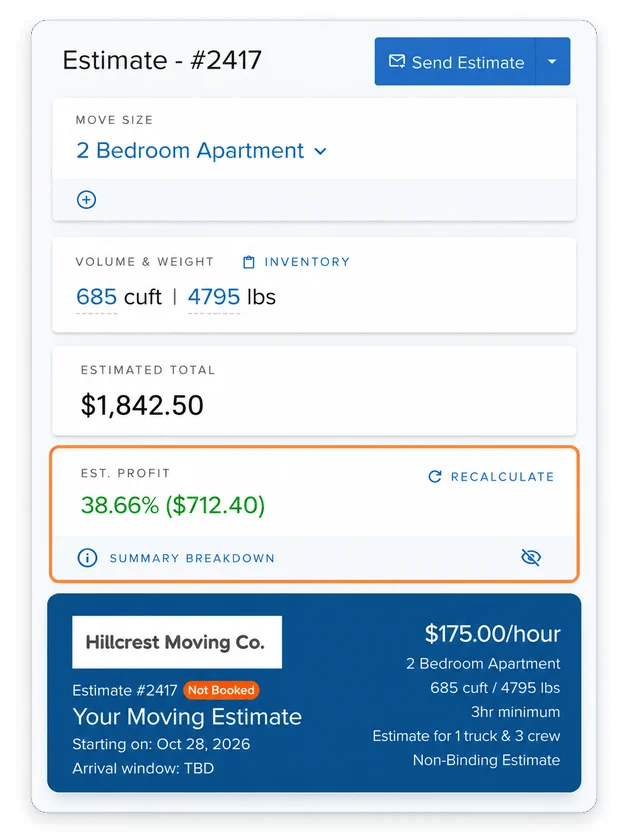
Know what a job should earn before you book it
See projected profit as you build an estimate, with labor, truck, fuel, and material costs factored in before you commit to a price.
Run every location from one place
Manage scheduling, crews, settings, and reporting across multiple branches without upgrading your plan just to add another location.
1,200+ moving companies across 2,200+ operations in the US and Canada choose SmartMoving to run their operations.




“I trusted SmartMoving because it’s more established and has a range of customers. I knew it would meet our needs better than the other system we were looking into.”
Allison Endicott
CEO, Wirks Moving & Storage · Chose SmartMoving over Supermove
“The Crew app is so easy for my team to use and awesome for me with the reporting we can do through that with incentives, upsells, and more.”
Adam Gurwell
Vice President, Moving Ahead Services · Previously on Supermove
SmartMoving vs. Supermove: Feature Comparison
Both platforms help moving companies manage sales, scheduling, crews, inventory, billing, and more. The differences come down to how each platform handles your workflows, which capabilities are included in your plan, and how the software supports your business as it grows.
| Capability | SmartMoving | Supermove |
|---|---|---|
| Platform overview | Moving software for residential, commercial, long-distance, storage, and military movers | Operations platform and AI sales suite for enterprise movers |
| CRM & lead management | Capture and route leads, track customer history and sales activity, manage opportunities, and automate follow-ups through booking. | Capture leads, track customer history and sales activity, manage customizable sales stages, and automate follow-ups through booking. |
| Estimates & job profitability | Build estimates using configurable tariffs, inventory, and pricing rules. See projected profit, including labor, materials, truck, and fuel costs, before booking. | Build estimates using configurable billing formulas, tariffs, inventory, and pricing rules. Track project revenue, labor costs, other costs, and gross margins. |
| Scheduling & dispatch | Schedule jobs and assign trucks, crews, and equipment across branches, with availability views and double-booking safeguards. | Schedule jobs and assign trucks and crews across branches, with dispatch calendars and live job tracking. |
| Crew & survey apps | Native iOS and Android crew apps for time tracking, paperwork, inventory, signatures, and payments. Separate offline-capable tablet app for pre-move surveys. | Native Android crew app for time tracking, paperwork, inventory, signatures, and payments. Browser-based iOS support and survey tools with limited offline functionality. |
| Multi-branch management | Manage multiple branches with location-specific settings, permissions, scheduling, and reporting from one account. Included in both SmartMoving plans. | Manage multiple branches with location-specific access, scheduling, and reporting. Requires Supermove’s Pro-tier subscription. |
| Inventory & claims | Item-level inventory with photos, condition details, barcode/QR scanning, and required damage photos. Track claim costs, settlements, and customer claim status. | Digital inventory with photos and condition documentation. Track claims by type, status, estimated and actual costs, and associated crews. |
| Storage management | Track warehouse, container, and item-level inventory with recurring billing. Customers can view stored items, photos, and request returns through a self-service portal. Container and rack location scanning is coming soon to Smart Pro. | Track warehouse locations, storage containers, and customer inventory with recurring storage invoices and automatic card payments. |
| Customer communication & automation | Automated email and SMS follow-ups, reminders, and task workflows, with customizable rules by branch. Optional Smart Marketing adds multi-step campaigns and segmentation. | Automated email and SMS follow-ups, reminders, and task workflows, with customizable triggers, conditional logic, and two-way email communication. |
| Payments | Unified payments through Remedy, with credit, debit, and e-check processing, pre-authorization, crew collection, and recurring storage billing. Job-linked transactions, accounting sync, and automated e-check failure tracking with backup-card recovery. | Integrated credit card processing through Supermove Payments or Stripe, with deposits, saved cards, crew collection, refunds, recurring storage billing, payment tracking, and QuickBooks sync. ACH payments are processed through QuickBooks and manually recorded in Supermove. |
| Reporting & analytics | Live dashboard for residential and commercial moves. Sales, operations, marketing, and accounting reports with filtering, exports, and scheduled delivery.
Optional Smart Insights add-on: Real-time custom dashboards, calculated fields, visualizations, cross-functional reporting, sharing, and conditional alerts.
|
Sales, dispatch, project profitability, accounting, and lead-source reporting, with configurable reports and branch-level comparisons. |
| AI | Included at no additional cost: TOB-E AI operations assistant answers operational questions, surfaces issues needing attention, and provides recommendations based on your company data.
Optional Smart Scout add-on: AI-powered sales assistant answers calls 24/7, qualifies leads, and drafts estimates for your team to review and send. Supports 10 languages and automatically logs calls in SmartMoving.
|
AI sales copilot and voice agents, and Autopilot workflows support sales conversations, call handling, and automated tasks, with usage-based pricing. |
| Integrations & API | Open API with webhooks, plus pre-built integrations with Remedy Payments, QuickBooks Online, RingCentral, LiveSwitch, Mailchimp, Wisetack, Google Calendar, Microsoft 365, website form plugins, Relocation Insurance Group (RIG), and NationalExpress Move. | Integrations for QuickBooks, calendars, email, and lead sources. Lead APIs support data intake, while automation-triggered webhooks send updates to other systems. |
Last updated November 2026. Based on publicly available information from supermove.com, its help center, and its G2 listing. Features and availability may change. Supermove is a trademark of its respective owner and is used for comparison purposes only.
Where SmartMoving pulls ahead
A closer look at how the differences play out when you’re quoting jobs, sending crews into the field, and managing a growing business.
When you’re quoting a job and need to know what you’ll make
SmartMoving
See projected profit while building the estimate, with labor, truck, fuel, and materials costs factored in before booking.
Supermove
Track revenue, costs, and profit through project reporting.
When you’re doing a survey with no cell service
SmartMoving
Keep building inventory in the offline-capable Pre-Move Survey app and sync when you’re connected again.
Supermove
The Survey Tool supports limited offline use, but Supermove warns that you can lose unsaved data if you exit while offline.
When you’re opening another location
SmartMoving
Manage branches from one account with location-specific settings, scheduling, and reporting. Multi-branch management is included in both plans.
Supermove
Manage branches from one platform, with location-specific access and reporting. Multi-branch functionality requires Pro.
When you need to know what needs attention today
SmartMoving
TOB-E’s Morning Briefing flags unconfirmed crews, unpublished jobs, outstanding payments, and overdue follow-ups, with links to address them.
Supermove
Autopilot agents can automate configured tasks and workflows, with credits charged for completed work.
The questions to ask when comparing prices
The monthly subscription is only part of the cost. Here’s what to ask both vendors so you know what you’re getting and what you’ll pay as your business grows.
Which AI capabilities are included and which cost extra?
SmartMoving includes TOB-E in both plans, while Smart Scout is optional. Supermove offers AI products with usage-based pricing. Ask what’s included and how usage is calculated.
Will adding users, crews, or locations change my subscription?
Compare office-user limits, crew licenses, brand requirements, and any upgrades needed as the company grows.
What will payment processing cost?
Ask about card and ACH/e-check processing rates, transaction fees, failed-payment handling, and the payment providers available.
When Supermove may be a good fit
Every moving company runs differently. Supermove may be a good fit if AI voice agents, automated outbound dialing, or live GPS tracking are top priorities for your business. Just be sure to factor in any additional costs for those capabilities.
Built for movers who are building something bigger
See what growing moving companies are doing with SmartMoving.

Customer story · Moving Ahead Services
“When we worked with Supermove, there were some instances of overpromising and underdelivering. Between that, needing more functionality for our branches, and other helpful features, SmartMoving stuck out. Price was also a big difference for us. SmartMoving offers a lot of advanced features at a better price, and the price was transparent.”
– Adam Gurwell, Vice President, Moving Ahead Services
5
Branches run from one account
25+
Trucks
30+
Full-time employees
SmartMoving vs. Supermove: Frequently Asked Questions
Is SmartMoving a good alternative to Supermove?
Yes, especially if you want native iOS and Android crew apps, projected profitability while estimating, multi-branch management, item-by-item inventory with claims tracked to outcome, and an AI operations assistant included in your subscription.
More than 1,200 moving companies across 2,200+ operations in the US and Canada run on SmartMoving, including companies like Moving Ahead Services, which switched from Supermove.
How does SmartMoving pricing compare to Supermove?
Both platforms offer different plans and optional capabilities. SmartMoving includes multi-branch management and TOB-E in both plans, while Supermove requires Pro for multi-branch management and offers usage-based AI products. Your total cost will also depend on users, crew licenses, payment processing, add-ons, and implementation.
Are SmartMoving’s AI features included, or billed by usage?
Yes. TOB-E, SmartMoving’s AI operations assistant, is included with every subscription at no additional cost—no tokens to buy or usage-based AI fees to track. Smart Scout, the optional AI sales assistant, answers calls, qualifies leads, and drafts estimates for your team to review and send. Smart Scout has separate subscription and usage charges.
Does SmartMoving offer the same features as Supermove?
Both cover the core of running a moving company: crew apps, surveys, storage, payments, integrations, and AI. SmartMoving goes further in a few areas, including native iOS and Android crew apps, an offline-capable Pre-Move Survey app, barcode/QR scanning with required damage photos, projected job profit before booking, debit and e-check payments, and multi-branch management in both plans.
How long does it take to switch from Supermove to SmartMoving?
Most customers are fully onboarded in 3 weeks, though the timeline depends on the complexity of your business. You’ll work with an onboarding manager to configure your account, set up payments and integrations, train your team, and begin running live jobs. Your onboarding plan is tailored to your business and any data migration requirements.
What onboarding and support do I get?
You’ll receive guided onboarding with a dedicated onboarding or customer success specialist, including help with account configuration, workflows, payments, and integrations.
Your team can also use SmartMoving Academy for training and access help through in-app chat, email, and phone support. Additional one-on-one training sessions are available.
Is SmartMoving a fit for larger, multi-branch, or commercial movers?
Yes. SmartMoving supports residential, commercial, long-distance, storage, and military moving operations. You can manage multiple branches from one account with location-specific settings, scheduling, permissions, and reporting. Moving Ahead Services, for example, operates five branches and more than 25 trucks and switched to SmartMoving after using Supermove.
Bring your busiest day. We’ll show you how SmartMoving runs it.
Book a demo built around a day like yours and watch the crew app, TOB-E, and branch controls work through it, start to finish.


