



Your phone system knows who's calling. Your CRM knows which customers have booked. Your marketing tools know where your leads come from. And your accounting software knows who's paid.
So why is someone in your office still copying information from one to the next?
Most moving companies already pay for plenty of software. The trouble is the systems don’t talk to each other. An API is how you get them talking, and you don’t need to be a developer to see why that matters.
The short version
- What an API does: It lets two software systems share information, so your phone system can pull up a caller's CRM record before your rep says hello.
- Integrations, automations, and APIs: Integrations connect two apps, automations run steps without manual work, and APIs make custom versions of both possible.
- Where movers use them: They capture accurate lead sources, route new leads faster, and combine sales, marketing, and phone data into one report.
- Before you build: You don't need to code to spot repetitive work worth automating, but custom integrations usually need a developer. Check what your software's API supports first.
What is an API?
An API, or application programming interface, lets two software systems exchange information.
Think of it like sharing a Google spreadsheet. When you share a spreadsheet, you decide who gets access and what they're allowed to do. Some people can only view the information, while others can make changes.
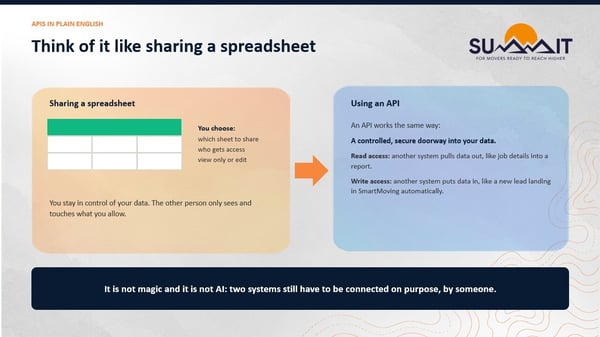
An API works the same way. Depending on the permissions it allows, one system can read information from another, like a viewer, or update records and trigger actions, like an editor.
A potential customer calls your moving company. Your phone system recognizes the number, checks your CRM for an existing record, and pulls up the customer's information before your sales rep even says hello.
Instead of searching for the customer, asking them to repeat information, or manually logging the interaction, your systems are already working together.
What's the difference between integrations, automations, and APIs?
An integration connects two apps, an automation runs steps without someone starting each one, and an API is what makes custom versions of both possible. The terms often get used interchangeably, but the difference matters when you’re figuring out what your software can already do.
- Integrations connect two software applications so they can share information. For example, syncing booked jobs to your Google or Outlook calendar so the office isn’t checking two schedules.
- Automations make something happen without someone manually starting every step. That could mean assigning a new lead to a salesperson, creating a follow-up task, or notifying a team member when a job is booked.
- APIs are the technology behind custom integrations and more advanced automations. They give developers a way to connect systems and build custom workflows around how your business runs.
Some integrations and automations are already built into your moving company software. Others require custom API connections to get the systems working exactly how you want.
For example, SmartMoving’s QuickBooks integration sends your invoices and payments straight to QuickBooks, so nobody has to enter the same invoice twice.
But what if you wanted to connect a specialized phone system, build a custom marketing dashboard, or automatically update records based on activity in another platform? Those are jobs for a custom API integration.
What can moving companies do with APIs?
Moving companies use APIs to track lead sources accurately, respond to leads faster, and build reports across their systems.
At SmartMoving SUMMIT 2026, our product team and integration experts from ZenPoint showed how movers are putting them to work.
Keith Bunch, VP of Product, describes where he sees it going:
"SmartMoving is the data layer that feeds all of your systems, and you're able to custom build on top of it to solve your use cases."
1. Capture leads and track where they actually come from
When lead sources are entered manually, it's easy for a sales rep to mark a caller as coming from “organic search” when they actually found your company through a paid ad.
APIs can connect call tracking, marketing platforms, and your moving CRM to capture more accurate lead source information, giving you a clearer picture of which campaigns are generating revenue.
2. Respond to new moving leads faster
Every minute matters when a potential customer requests a quote. Yet only 38% of moving companies respond to leads within 5 minutes, according to SmartMoving's 2026 State of Moving Report.
APIs can connect lead sources, your CRM, and communication tools to automate lead routing and reduce the time between a new inquiry and sales follow-up. See how your speed compares to the latest moving company sales benchmarks.
3. Build custom reports that give you the full picture
Your sales, marketing, and phone systems all have valuable data. APIs can connect information across these platforms to create custom reports and give owners better visibility into the KPIs that drive business performance.
Top performers lean on reporting more. According to SmartMoving’s 2026 State of Moving Report, 71% use reporting tools, compared with 60% of the industry overall.
In the full workshop, Keith and the ZenPoint team walk through how movers are putting these to work.

Do you need a developer to use an API?
Not to spot the opportunities, but usually to build them. You don't need to know how to code to recognize where automation could help your moving company.
Start by identifying where your team is spending time on repetitive tasks.
-
Are sales reps manually copying information between systems?
-
Is someone updating spreadsheets every week?
-
Are customer calls getting routed to the wrong department?
-
Are you struggling to connect marketing spending to booked revenue?
Some tools offer prebuilt integrations or no-code automation options, but building a custom API integration generally needs a developer or IT resource to configure, test, and maintain it.
Not all APIs offer the same capabilities. Some let you retrieve data for reporting. Others let you create or update records and trigger workflows automatically. Features such as webhooks, which notify connected systems when an event occurs, can make more advanced automations possible.
Before investing in an integration, find out what your software supports, what access is included in your plan, and whether the other systems you're connecting have compatible APIs.
"An hour spent reviewing the documentation can save you years of being stuck later."
– Janysh Osmon, CEO, ZenPoint
How do you choose moving company software you won’t outgrow?
Look at how it connects, not just what it does today. The software you’re using now might handle everything your moving company needs. But what happens when you add a second location, take on commercial work, or need reporting across both?
Without connected systems, each of those steps tends to bring another login, another spreadsheet, and another person re-entering the same job. That’s why it’s worth asking how a platform connects to your other tools before you choose moving company software.
SmartMoving runs the core of your business, from the first call through billing, and connects to the tools you already depend on. Every SmartMoving plan includes the Lead API, which sends leads from your website forms and lead providers straight into SmartMoving, and the Open API, which gives reporting tools like Power BI and Tableau read-only access to your data.
For full read and write access and webhooks that push job updates to your other tools, the Premium API is available as an add-on. As you add services and locations, you keep building on the same platform instead of replacing it.
Already on SmartMoving? You can turn on the API in your settings.



